TheGosset FI Portal vs. Tiller Money: Free Modern Alternative
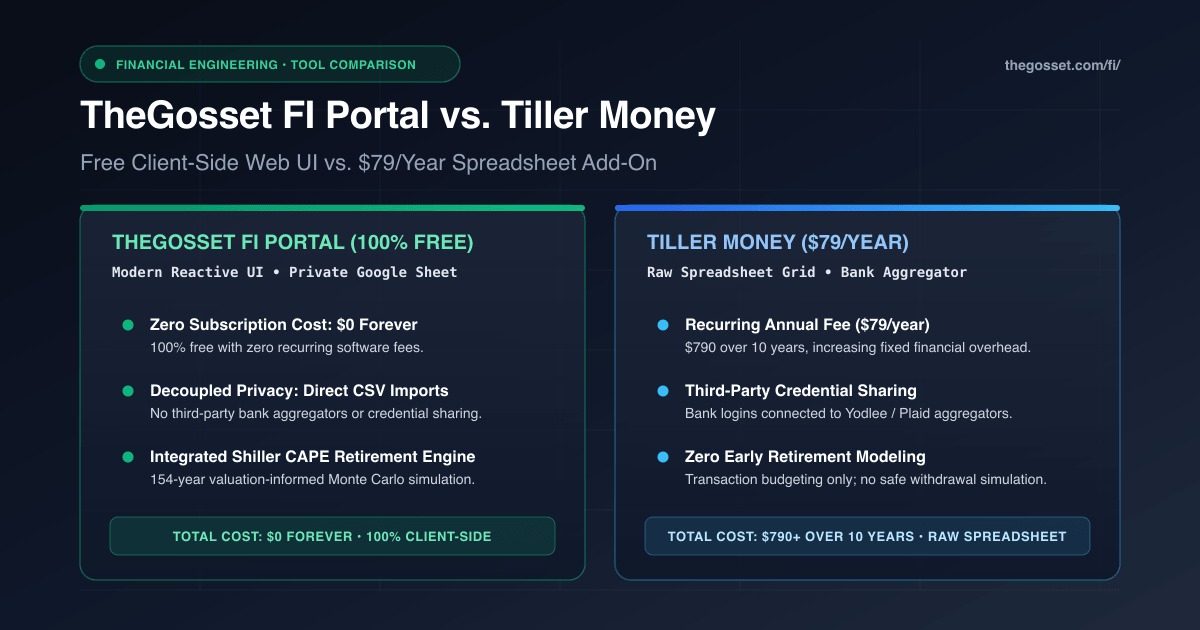
Spreadsheet budgeters are a distinct breed of personal finance enthusiasts.
While average consumers settle for commercial budgeting apps that package credit score checks and loan advertisements, spreadsheet users prefer direct data ownership. A spreadsheet cannot cancel your account, lock your data behind a proprietary format, or sell your spending history to credit card issuers.
In the spreadsheet ecosystem, Tiller Money (tillerhq.com) carved out a dedicated following by solving the most tedious part of manual bookkeeping: automatically pulling bank transactions and account balances into Google Sheets and Microsoft Excel.
Yet as users settle into Tiller, several practical challenges often emerge:
- An ongoing $79 a year subscription fee that permanently increases your fixed software overhead.
- The security trade-off of handing bank login credentials to third-party aggregation providers (Yodlee and Plaid), accompanied by frequent multi-factor authentication disconnects.
- The visual limitation of working strictly inside dense, raw spreadsheet rows, which makes checking finances on a mobile phone awkward.
- The complete absence of forward-looking retirement simulation: Tiller is built exclusively for historical budgeting, with zero safe withdrawal rate math or Monte Carlo analysis.
TheGosset FI Portal takes a different technical approach. It uses Google Sheets as a headless, private database, while presenting a modern, reactive single-page dashboard with zero subscription fees and built-in Shiller CAPE early retirement modeling.
Here is an empirical comparison of how both platforms compare across security, daily workflow, user interface, and long-term costs.
At-a-Glance Feature Matrix
| Feature / Dimension | TheGosset FI Portal | Tiller Money |
|---|---|---|
| Pricing | 100% Free ($0 forever) | $79 / Year recurring subscription |
| Bank Aggregator Exposure | Zero (Direct CSV import) | Third-party aggregators (Yodlee / Plaid) |
| Bank Login Credentials | Never shared with any party | Stored with financial aggregator |
| OAuth Permission Scope | Minimal (drive.file only) |
Full spreadsheet add-on permissions |
| Underlying Data Store | Your Private Google Sheet | Google Sheets or Microsoft Excel |
| User Interface | Modern Reactive Web UI | Raw spreadsheet rows and cells |
| Mobile Experience | Responsive web application | Spreadsheet grid zooming and scrolling |
| Net Worth Tracking | Built-in multi-account hero | Foundation template spreadsheet tab |
| Bank CSV Import Engine | Built-in with merchant memory | Manual copy-paste if sync breaks |
| Retirement SWR Simulation | Dynamic Shiller CAPE Engine | Not supported |
| Capital Outlay Sandbox | Built-in #bigDecisionModal |
Not supported |
Architecture & Security: Direct CSV vs. Bank Aggregation
How financial data enters your spreadsheet is the central architectural divergence between these two systems.
┌────────────────────────────────────────────────────────────────────────┐
│               Architecture & Data Sovereignty Comparison               │
├───────────────────────────────────┬────────────────────────────────────┤
│ TheGosset FI Portal               │ Tiller Money                       │
├───────────────────────────────────┼────────────────────────────────────┤
│ • 100% Free ($0 Forever)          │ • $79 / Year Recurring Cost        │
│ • Direct Google Sheets (drive.file│ • Google Sheets / Excel Add-on     │
│ • Zero Third-Party Aggregator Sync│ • Yodlee / Plaid Bank Connections  │
│ • Client-Side Bank CSV Importing  │ • Automated Daily Bank Aggregation │
│ • Modern Reactive Web UI Dashboard│ • Raw Spreadsheet Grid UI Only     │
│ • Shiller CAPE Retirement Engine  │ • No Retirement Simulation Engine  │
└───────────────────────────────────┴────────────────────────────────────┘
The Tiller Aggregation Model
Tiller automates bank statement collection by partnering with financial aggregators like Yodlee. To enable automated feeds, you provide your online banking usernames and passwords through their connection portal.
For investors who hate manual bookkeeping, automated transaction syncing is convenient.
However, bank aggregation has real trade-offs:
- Security Exposure: Handing financial institution credentials to third-party data brokers increases your digital attack surface.
- Connection Fragility: When banks update security protocols, anti-fraud algorithms, or two-factor authentication requirements, automated connections frequently disconnect, requiring manual credential re-entry.
- Data Sharing: Aggregator terms of service often permit anonymized data sharing with market research partners.
The Client-Side Decoupled Model (TheGosset FI Portal)
TheGosset FI Portal deliberately avoids third-party bank aggregators.
Instead of handing over bank passwords, you drop raw statement CSVs from Chase, American Express, Capital One, or Vanguard directly into the browser uploader:
- The parser runs entirely in your local browser window.
- An intelligent matching engine maps institution-specific column headers in one click.
- The engine automatically identifies internal debt transfers, credit card payments, and investment deposits to eliminate false double-counting.
- When you recategorize a merchant or restore a transaction, your custom rule is saved permanently to your Google Sheet, so future statement imports categorize the vendor instantly.
Your bank credentials remain strictly between you and your bank. The application requests only the minimal drive.file Google OAuth scope, meaning it can only see the specific template file you choose to connect.
User Interface: Modern Reactive Web App vs. Raw Spreadsheet Grid
Both tools utilize Google Sheets for data storage, but they present that data through contrasting interfaces.
Working with Raw Spreadsheet Rows (Tiller)
Tiller operates strictly inside the Google Sheets or Excel grid.
While spreadsheets offer infinite cell-level flexibility, they are not optimized for fast visual analysis:
- Checking account balances on a mobile phone requires pinching, zooming, and scrolling across wide columnar sheets.
- Tiller templates rely on dense arrays of complex formula lookups (
=ARRAYFORMULA,=VLOOKUP,=QUERY). Accidentally editing a cell or deleting a header row can silently break downstream calculation formulas. - Visual charts in standard spreadsheets lack responsive touch tooltips, animated progress bars, and high-density SVG sparklines.
Headless Spreadsheet Architecture (TheGosset FI Portal)
TheGosset FI Portal uses Google Sheets as a headless database while rendering a dedicated, responsive web dashboard:
First, it delivers instant mobile usability. You can check your net worth, inspect monthly expenses, or simulate retirement dates on any screen width down to 375px with zero horizontal scroll or layout shifts.
Second, it provides interactive data visualizations. You can inspect SVG asset allocation donuts, bidirectional delta progress bars, and multi-decade simulation graphs with immediate interactive hover states.
Third, it strictly separates data from presentation. Because the web interface reads and writes through the official Google Sheets API v4 using structured schemas, you cannot accidentally break calculations by scrolling or sorting.
You get the transparency of a private spreadsheet without the friction of a spreadsheet UI.
Retirement Simulation: Built-in Shiller CAPE vs. Zero Modeling
Tracking historical transactions is only half the battle when pursuing financial independence. The critical question is always: When can I afford to retire, and how much can I safely withdraw?
Tiller: Backward-Looking Budgeting Only
Tiller is designed entirely as a historical budgeting tool. It records what you spent last month and categorizes where your income went.
It does not offer early retirement calculators, Monte Carlo failure testing, or withdrawal rate simulations. If you use Tiller, you must export your balances into a separate third-party calculator to understand retirement readiness.
TheGosset FI Portal: Forward-Looking Retirement Engine
TheGosset FI Portal connects your actual historical wealth directly into a forward-looking early retirement engine powered by Robert Shiller's 1871-to-present dataset:
SWR_t = α + β · (1 / CAPE_t)
Where baseline parameters α = 1.75% and β = 0.50 adjust allowable portfolio spending based on prevailing market valuations.
The system automatically pulls your live liquid investments and actual annualized living spending directly from your sheet.
Through the Historical Cohort Audit Drilldown (#retirementAuditModal), you can click any historical cohort (1929, 1966, 1973, 2000, 2008) to inspect year-by-year cash flows.
Through the Capital Outlay Sandbox (#bigDecisionModal), you can stress-test one-off life events (like real estate down payments, sabbaticals, or college tuition) and instantly see how your financial independence timeline shifts.
We have detailed how these dynamics protect portfolios across six comprehensive case studies:
- Liam: $350k Coast FIRE in the 2000 Lost Decade
- Elena: $600k LeanFIRE in 1970s Stagflation
- Maya: $800k Barista FIRE in the 2008 Crash
- Marcus & Priya: $1.25M Core FIRE in the 2000 Dot-Com Bubble
- David: $2.5M ChubbyFIRE in the 2008 Crash
- The Sterling Family: $5.0M FatFIRE in 2021 All-Time Highs
When to Choose Which Tool
Both platforms respect spreadsheet ownership, but they cater to different workflows:
Choose Tiller Money If:
- Automated daily bank scraping is your highest priority, and you are willing to pay $79/year for aggregator convenience.
- You prefer interacting with your personal finances strictly inside spreadsheet cells, grid rows, and pivot tables.
- You are comfortable sharing bank credentials with financial aggregation providers.
- You already use separate calculators for early retirement planning and only need transaction ingestion.
Choose TheGosset FI Portal If:
- You want zero subscription costs and zero recurring software fees forever.
- You value complete banking privacy and prefer direct CSV uploads without sharing credentials with data aggregators.
- You want a fast, responsive dark-mode web application that works cleanly on both mobile and desktop.
- You want an integrated financial home that combines daily wealth tracking with empirical Shiller CAPE retirement simulations.
- You appreciate intelligent CSV statement imports with merchant rule memory and internal transfer filtering.
Experience TheGosset FI Portal
You can test the entire platform without creating an account or providing an email address:
👉 Launch TheGosset FI Portal in Interactive Demo Mode
When you are ready to connect your personal Google Sheet, follow our complete setup guide: